
Why signing in to a second account logs you out of the first (and how to stay logged into both)
Cookies are scoped to a site, not to a tab, so a second login overwrites the first. Here is how sessions actually work and the ways around it.
You sign in to a second account, switch back to the first tab, and you're suddenly the second person there too. Or the first tab asks you to log in again. Nothing is broken. The site did exactly what browsers are designed to let it do, and once you see why, the ways around it (and their trade-offs) make a lot more sense.
A login lives in the browser, not in the tab
When you type your password, the site checks it and creates a session on its server. It then hands your browser a small token, usually in a cookie, along the lines of session=8f3a…. From then on the browser attaches that cookie to every request it sends to that site. That cookie is the whole reason you stay signed in.
The important detail is where the cookie is kept. Cookies belong to the site's domain, and they're stored once per browser profile. Every tab and every window in that profile reads from the same cookie jar. A tab has no cookies of its own. So when you sign in as a second person, the site sets the same cookie again with a new value, and every tab that talks to that site is now the second person.
Cookies aren't the only thing shared. Modern sites also keep state in local storage, IndexedDB, service workers and the cache, and all of those are also stored per site, per profile. Even if you could somehow keep two cookies, the rest of the site's data would still collide.
Why Google can do it and most sites can't
Gmail lets you add a second account and keeps both signed in. That's because Google built it into its own sites: it keeps several sessions in one set of cookies and puts an account number in the URL (the /u/0/ and /u/1/ you see in Gmail addresses). It's a feature of Google's sites, not of the browser.
That's also why it only goes so far. A shop dashboard, a social network or an internal company tool usually has no switcher at all. And even with Google, links that arrive without the account number (from a chat message or a document, say) tend to open in whichever account is the default, which is how people end up commenting on a work document as their personal self.
The general fix: a second cookie jar
If one profile means one cookie jar, then staying signed in to two accounts means getting a second, fully separate jar. Every method you'll find does this in some form:
- An incognito or private window. One extra, temporary jar. In Chrome, all incognito windows share that one jar, so it's good for exactly one extra account, and it's emptied when you close the last incognito window.
- A second browser profile (Chrome, Edge). A completely separate browser state with its own window, bookmarks, extensions and history. Very solid isolation, at the cost of juggling windows.
- Containers (Firefox, and Brave since 1.92). Separate cookies and site storage per container, inside the same window, with a colored label on each tab.
- A second browser. Chrome for one account, Firefox for the other. Works, but now you have two sets of everything.
We compare these properly, including when each one is the right choice, in profiles vs. containers vs. incognito. The short version: they all work, and the differences are about how much of your day you spend managing them.
How Selves keeps two logins apart
Selves is built around this problem, so it's worth explaining what's underneath.
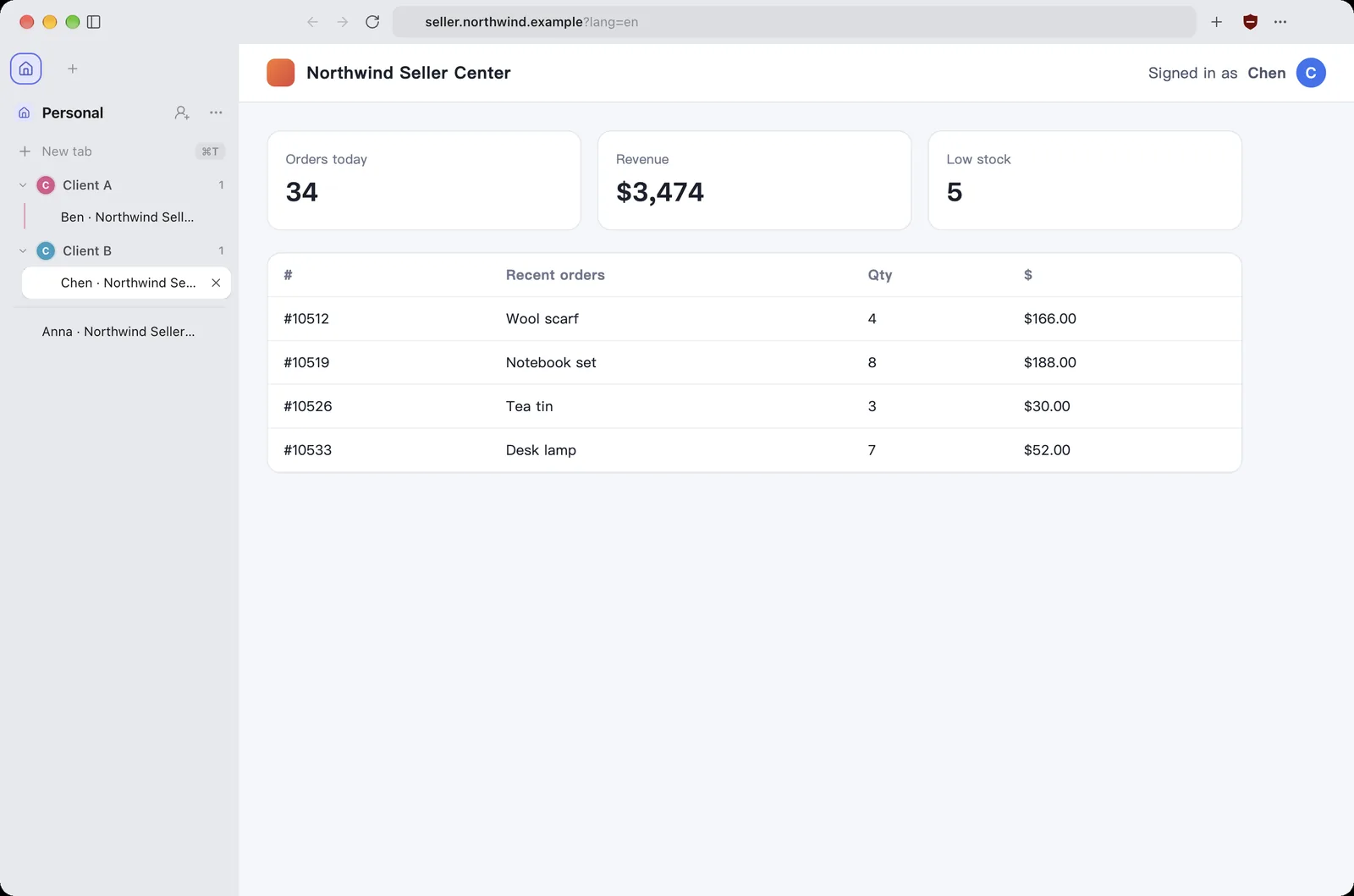
Every separate sign-in in Selves (each workspace's default sign-in, and each account you add inside a workspace) is its own Chromium profile, stored in its own folder on your computer. That means its own cookies, local storage, IndexedDB, cache, service workers and site permissions. A tab simply belongs to one of those sign-ins: the account group it sits in, or otherwise its workspace.
We considered lighter approaches first. Cookie-switching extensions swap cookies in and out of a single jar, but that can't work for two tabs that are open on the same site at the same moment, and it ignores everything a site keeps outside cookies. Chromium already has an isolation boundary that is tested by every Chrome user who has more than one profile, so we use that rather than inventing our own. The cost is that each sign-in has its own cache on disk; the benefit is that nothing a site stores for one account is visible to the tabs of another.
A few consequences follow from that design, and they're useful to know:
- You stay signed in after a restart. We keep session cookies when you quit, so accounts that would normally sign you out at the end of a session don't.
- "Sign in with…" pop-ups land in the right account. A pop-up opens inside the same sign-in as the tab that opened it, and Selves places it next to that tab.
- Moving a tab to another account reloads it. Cookies can't travel with a page, so the page reopens under the new sign-in. Anything you'd typed but not submitted is lost.
Setting it up
- Download Selves and create your first workspace. During setup you can tick "I want to use multiple accounts on the same site" to create an account right away.
- Sign in to the site as usual. This is your workspace's default sign-in.
- Right-click the tab and choose Open with another account → New account…. Give the account a name you'll recognize, such as "Client A" or "Second shop".
- The page opens in the new account. Sign in with the other login.
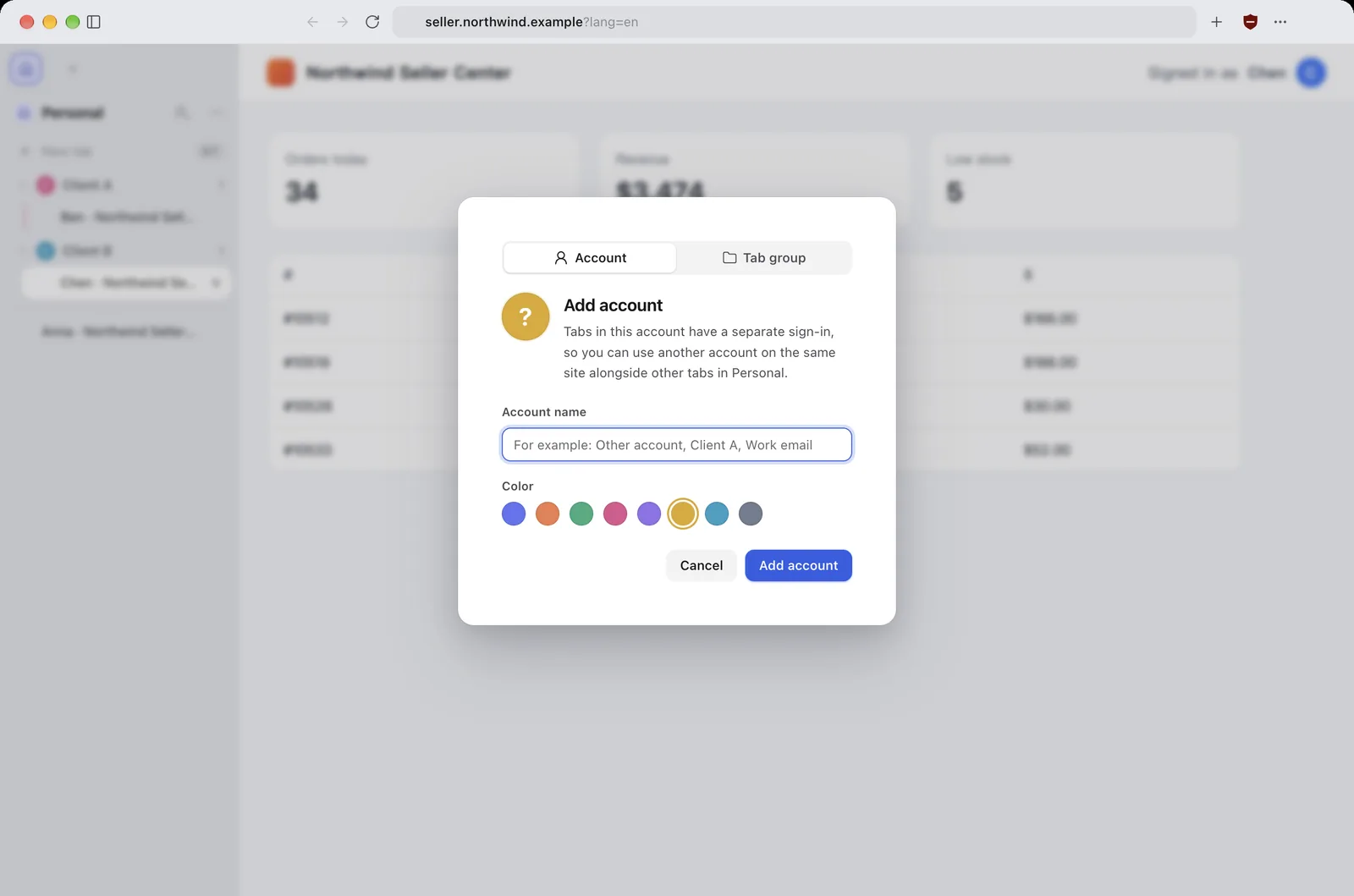
Both tabs now stay signed in side by side. The account shows up in the sidebar as a group with a round avatar, so you can always see which tab is which person. While you're in that account, ⌘T (or Ctrl+T on Windows and Linux) opens new tabs in the same account, and you can right-click any link and pick Open link with another account.
What this doesn't do
Separate sign-ins solve the cookie problem and nothing else. It's worth being clear about the edges:
- The site still sees one computer. Your accounts share your IP address and your device. Selves doesn't change your user agent or disguise your browser, by design. If a platform's rules limit how many accounts you may have, a browser won't change that. We go into this in managing several seller accounts.
- Some sign-ins can be refused. Google, in particular, sometimes blocks sign-in from browsers built on embedded Chromium as part of its own risk checks. That decision is on Google's side, and we can't override it.
- Each sign-in starts empty. That's the point, but it means signing in to your password manager extension, and to every site, once per account.
- The free plan includes three separate sign-ins (workspaces and accounts together). Plain tab groups don't count.
Do you need any of this?
If you only check a second account once a month, an incognito window is fine. If both of your accounts are Google accounts and you mostly live in Gmail, Google's own switcher may be all you need. Separate sign-ins pay off when you switch every day, need more than two accounts, or use sites that have no switcher at all. For a side-by-side look at every method, start with our guide to using multiple accounts on the same website.
About this article
Written by the team that builds Selves, about the current version of the browser. If something here is wrong or out of date, email support@selvesbrowser.com and we’ll fix it.
Stop signing out. Start using Selves.
Free download. Set up your first workspace in under a minute.
Free · macOS, Windows and Linux