
Browser profiles vs. container tabs vs. separate browsers vs. incognito: an honest comparison
Chrome and Edge profiles, Firefox and Brave containers, a second browser, or a private window: what each one really separates, and when to pick it.
There are five common ways to be signed in as more than one person in a browser, and every one of them works. They differ in what they keep apart, what they still share, and how much effort they take every day. We build one of the options, so we'll be upfront about where the others are the better choice.
All of them solve the same underlying problem: a browser keeps one set of cookies per site, so a second login replaces the first. (If you want the long version of why, we wrote it up in why a second login signs you out.)
The short version
| Method | What's separate | What's shared | The catch |
|---|---|---|---|
| Incognito / private window | One extra temporary session | Nothing persists | Only one extra account, gone when you close it |
| Chrome or Edge profiles | Everything: cookies, history, bookmarks, extensions, passwords, sync | Nothing | One window per profile |
| Firefox or Brave containers | Cookies and site storage per container | History, bookmarks, extensions | Tied to that browser |
| A second browser | Everything | Nothing | Two of everything to maintain |
| Selves accounts | Cookies and all site data per account | Bookmarks, history, extension installs | Newer, no sync yet |
Incognito and private windows
An incognito window starts with an empty cookie jar, so you can sign in to a second account there. Two details catch people out. First, in Chrome, every incognito window you open shares the same temporary session, so you get one extra account, not one per window. Second, it's all deleted when the last incognito window closes, so you sign in again every time. Extensions are also off in incognito by default.
Choose it when you need a second account for a few minutes: checking how your profile looks to others, a one-off login on a shared computer. It's built into every browser and costs nothing.
Chrome and Edge profiles
A profile is a complete, separate browser state: its own cookies, history, bookmarks, saved passwords, extensions, settings and, if you sign in, its own sync account. Each one opens in its own window with its own avatar. This is the strongest separation you can get without a second computer.
It's also the right tool when an employer manages your work account. Chrome and Edge can apply company policies to a work profile without touching your personal one, and Edge can switch to your work profile automatically when a link needs your work account.
The cost shows up when you switch often. Each identity is a separate window, so "which window is the client account in?" becomes part of your day. Extensions have to be installed and configured in each profile. In Chrome, links from other apps open in the profile you used last, which isn't always the one you wanted.
One naming trap: Edge Workspaces is a feature for sharing a set of tabs with other people. Despite the name, it isn't a way to keep logins apart.
Choose profiles when you want separation of everything, including bookmarks and history, or when one identity is a managed work account. They're also fine if you rarely switch.
Firefox and Brave containers
Containers keep cookies and site storage apart while everything else stays shared. You open a tab in a "Work" or "Shopping" container, it gets a colored label, and the site sees a separate session. Mozilla's Multi-Account Containers add-on pioneered this, including rules like "always open this site in this container", and Firefox 153 started building containers into the browser itself as a preview. Brave added built-in containers in version 1.92, bringing the idea to a Chromium-based browser.
This is close to the ideal for many people: one window, one set of bookmarks, a second session one click away. The trade-off is that you're choosing the browser along with the feature. Firefox runs Firefox add-ons, not Chrome Web Store extensions. Brave is a full-featured browser with its own rewards, wallet and assistant, which some people want and some don't.
Choose containers when you already use Firefox or Brave and like it. You don't need anything else.
A second (or third) browser
Chrome for work, Firefox for personal. Zero setup, and the separation is complete. People who do this usually stop at two browsers, because each new one means another set of bookmarks, extensions, settings and updates, plus another copy of a browser running in memory. It also doesn't help when you need two accounts of the same kind in the same context, like two shops you manage at once.
Choose it when you have exactly two worlds and want them to stay far apart, maybe even with different browser habits in each.
Selves accounts
Selves organizes tabs into workspaces (Personal, Work, a client), and each workspace has its own sign-in. When you need a second login on the same site, you add an account inside the workspace. It shows up as a group of tabs with a round avatar, all in the same window. Under the hood every sign-in is its own Chromium profile, the same isolation boundary Chrome uses for profiles, so the separation of cookies and site data is as strong as a Chrome profile's.
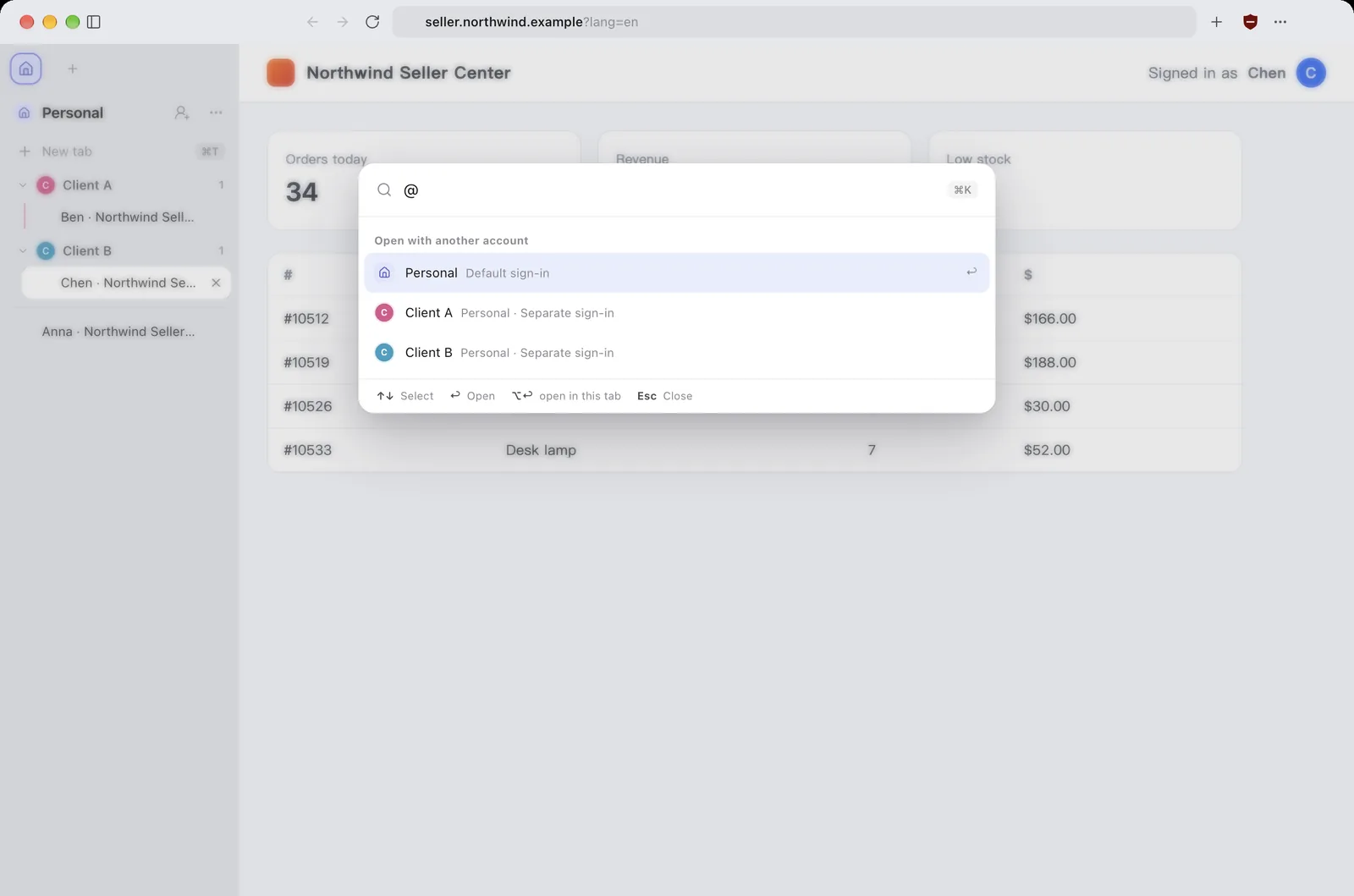
What's different is what we chose to share. Bookmarks and history are shared across workspaces (history notes which workspace a page came from), and extensions are installed once for every workspace. Extensions keep their own data per sign-in, though, so a password manager extension asks you to sign in to it once in each account. Selves runs Chrome Web Store and Microsoft Edge Add-ons extensions; we cover how in installing Chrome extensions in other browsers.
It's fair to list where Selves falls short today:
- No sync between computers and no importer from other browsers yet.
- Bookmarks aren't separated. If you need work bookmarks invisible from your personal side, Chrome profiles do that and we don't.
- The free plan has three separate sign-ins (workspaces and accounts combined). More needs Selves Pro.
- It isn't a managed browser. If your company requires Chrome Enterprise or Edge with its policies for work, use that for work.
Choose Selves when you switch between several accounts many times a day, need more than two of them, or want them organized by what you're doing rather than spread over windows.
Arc
Arc deserves a mention because many people used its Spaces, which could each be tied to a separate profile. Arc stops working on 22 December 2026 and new sign-ups have already closed. If you're moving off Arc, we've written about what moving to Selves looks like, including what doesn't come over.
How we'd pick
- One extra account, occasionally: incognito.
- A managed work identity, or separate bookmarks matter: Chrome or Edge profiles.
- You live in Firefox or Brave: their containers.
- Several accounts, daily, in one window, with Chrome extensions: Selves.
All of the comparisons above describe the browsers as of November 2026. Browsers change quickly; containers in particular are moving fast. Our comparison page has a feature table we keep up to date, and our guide to using multiple accounts on one site walks through each method step by step.
About this article
Written by the team that builds Selves, about the current version of the browser. If something here is wrong or out of date, email support@selvesbrowser.com and we’ll fix it.
Stop signing out. Start using Selves.
Free download. Set up your first workspace in under a minute.
Free · macOS, Windows and Linux